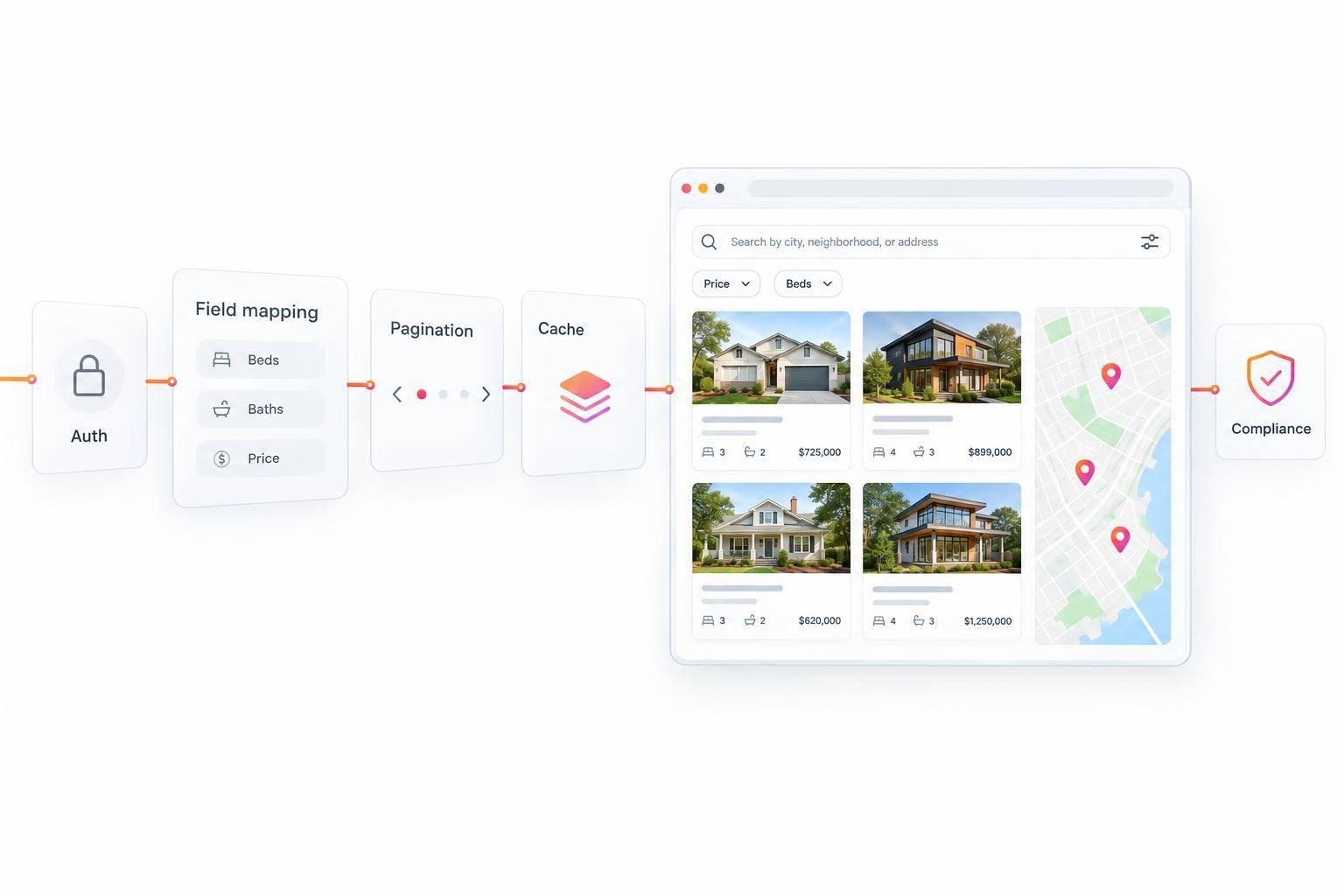
MLS API for Developers: Listings, Search, Authentication, and Compliance
An MLS API key lets your app request data - not publish it. Before I build a public listing search, I confirm MLS approval, allowed fields, required credits, and update deadlines. IDX displays generally need updates at least every 12 hours, or sooner when MLS rules require it.
Here’s the path I follow:
- Confirm access: Check broker approval, feed type, domains, fees, and EasyAgentIDX plan limits.
- Build search: Check the API schema, select permitted fields, and test filters and pagination.
- Protect requests: Keep keys server-side, validate inputs, and handle errors and rate limits.
- Control data: Follow cache limits and remove listings within MLS deadlines.
- Check the display: Show required credits, honor seller restrictions, and test before launch.
My rule: <u>working code is only half the job</u>. Permission and display checks come before publication.
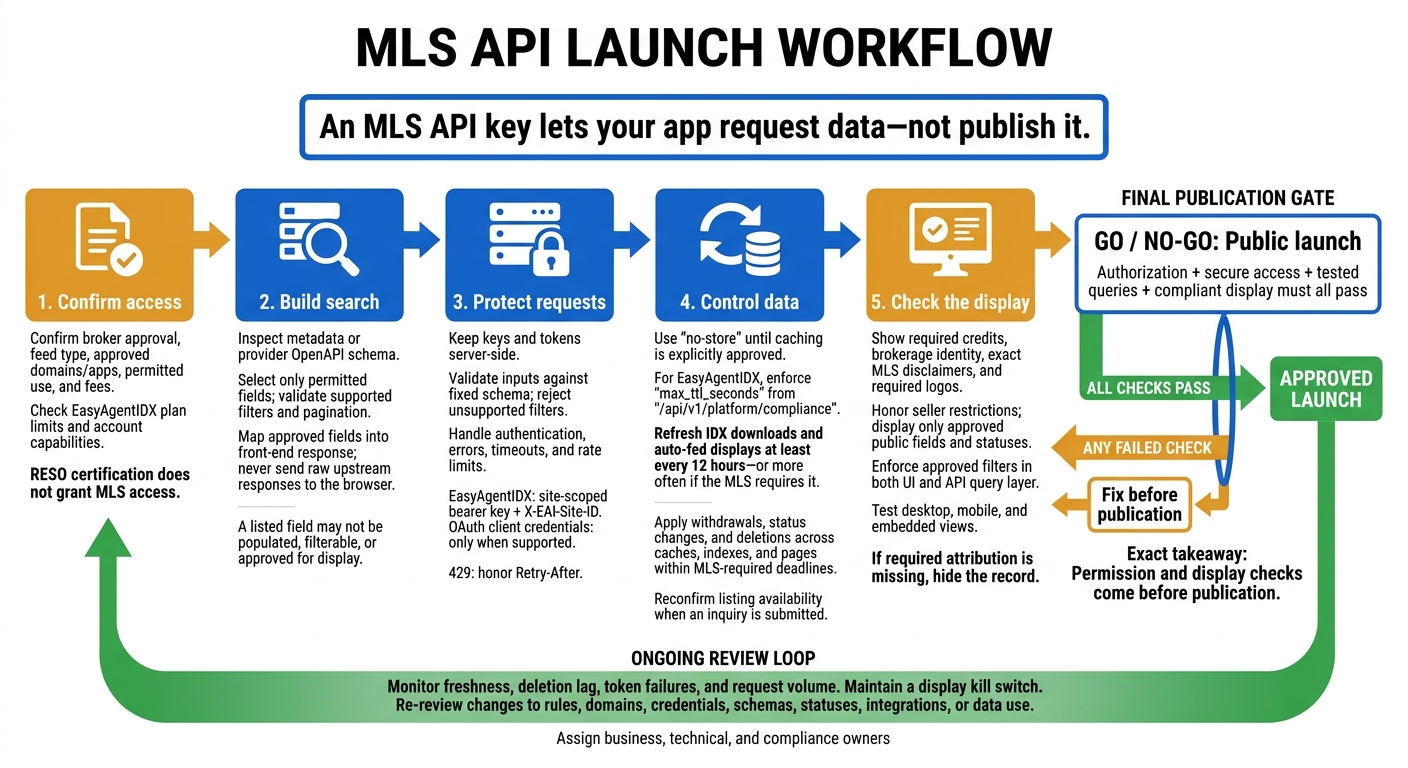
MLS API Launch: From Access to Compliant Display
Retrieve Listings and Build Search Queries
Inspect Resources and Choose Display Fields
Start with the metadata document. Confirm the resources, relationships, and lookup values you need - usually Property, Media, Office, and Member. A listed field may not be populated, filterable, or approved for display.
For EasyAgentIDX, check its OpenAPI document and account capabilities rather than assuming raw RESO field names apply. Its normalized schema uses snake_case. Use the documented endpoint and field names, then retrieve one listing with a narrow $select. Map only approved fields into the front-end response. Don't send the raw upstream response to the browser.
Illustrative single-listing request and shortened response:
GET https://api.example-mls.com/reso/Property?$filter=ListingKey eq 'ABC123'&$select=ListingKey,ListPrice,City,PostalCode,StandardStatus,ModificationTimestamp{ "value": [{ "ListingKey": "ABC123", "ListPrice": 525000, "City": "Austin", "PostalCode": "78701", "StandardStatus": "Active", "ModificationTimestamp": "2025-02-14T18:32:10Z" }] }
Use those approved fields to build your first filtered query.
Filter by Price, Location, and Property Type
This example returns active residential listings in Austin priced from $350,000 to $650,000, with at least three bedrooms and two bathrooms. Check your field map before choosing filters and sort keys; use only those the API supports.
For a ZIP search, replace the city condition with PostalCode eq '78701'. Use boundary, radius, polygon, or bounding-box filters only when documented.
Illustrative OData query, shown unencoded across lines for readability:
GET https://api.example-mls.com/reso/Property
  ?$select=ListingKey,ListPrice,City,PostalCode,BedroomsTotal,BathroomsTotal
  &$filter=ListPrice ge 350000 and ListPrice le 650000
    and City eq 'Austin'
    and PropertyType eq 'Residential'
    and StandardStatus eq 'Active'
    and BedroomsTotal ge 3 and BathroomsTotal ge 2
  &$orderby=ListPrice asc,ListingKey asc
  &$top=25
| Search control | Likely RESO field | Typical type | MLS-specific validation |
|---|---|---|---|
| Price range | ListPrice |
Decimal/integer | Confirm currency; the maximum must not be below the minimum. |
| City or ZIP | City, PostalCode |
String | Check accepted city names; preserve ZIP leading zeros. |
| Map boundary | Documented geography or coordinate fields | API-defined | Confirm supported operators and boundary definitions. |
| Property type | PropertyType |
String/enum | Use the exact local value and required enum syntax. |
| Status | StandardStatus |
String/enum | Confirm accepted values and display eligibility. |
| Bedrooms | BedroomsTotal |
Integer | Verify what the bedroom total includes. |
| Bathrooms | BathroomsTotal or BathroomsTotalInteger |
Decimal/integer | Confirm how half bathrooms are counted; don't assume 2.5 is supported. |
Once the filters work as intended, add pagination and format the results for display.
Handle Pagination and Format Results
Build query parameters with a URL encoder. Handle OData string escaping separately: an apostrophe inside a value needs OData escaping before URL encoding. Reject unsupported fields or filters with a clear message - never silently drop a filter. An empty value array means “no matches,” not an API failure.
Prefer @odata.nextLink when the API returns it. Follow the supplied URL without changing its token or adding parameters. Use $top and $skip only when documented, respect page-size limits, and add a stable secondary sort such as ListingKey. This helps sort listings with tied prices, but it can't freeze changing inventory. Set request limits and timeouts; use page and per_page only when the API documents them.
After the first page returns, normalize values before sending them to the UI. Keep prices as numbers and coordinates as decimal values. Map statuses and property types through approved lookups. Preserve ZIP codes such as "02139" as strings, and retain timezone-aware modification timestamps internally.
For display, render $525,000, use square feet when the source supplies that unit, and show clear U.S. dates such as Feb 14, 2025. Don't turn missing facts into zeros or infer missing attribution. Withhold records that can't meet required display rules.
Secure API Requests and Build the Search Backend
Keep browser input, server validation, MLS access, response mapping, and display output separate. Store caches on the server and pass required attribution through to the UI.
Once search queries work, secure authentication, validate inputs, and check data freshness before exposing results.
Request and Protect OAuth Access Tokens
Confirm the MLS authentication method before coding. EasyAgentIDX’s standard REST API uses site-scoped bearer keys with X-EAI-Site-ID, not client credentials. Follow the provider’s site-bound bearer key flow when required, or use OAuth client credentials when supported.
For OAuth, verify the token endpoint, scope, audience, grant type, and client authentication method. A typical server-side request looks like this:
curl --request POST "$MLS_TOKEN_URL" \
  --user "$MLS_CLIENT_ID:$MLS_CLIENT_SECRET" \
  --header "Content-Type: application/x-www-form-urlencoded" \
  --data-urlencode "grant_type=client_credentials" \
  --data-urlencode "scope=$MLS_SCOPE"
Send the returned token as Authorization: Bearer <access_token>. Track expires_in and renew the token before it expires. Use a lock so concurrent requests share one refresh.
On 401, refresh an OAuth token once. For a site-bound key, check the site binding instead. Keep tokens server-side and redact authorization headers and token responses from logs.
After authentication, validate every search input before sending it to the MLS.
Validate Search Inputs and Handle API Errors
Accept only a fixed search schema. Reject unknown fields, unsupported values, negative prices, reversed ranges, and out-of-bounds coordinates. Cap page size and radius at documented limits. Never accept raw upstream queries, and set finite connection and response timeouts.
Retry only transient failures, using bounded exponential backoff and jitter. Honor Retry-After and throttle requests per MLS connection. Return sanitized application errors with correlation IDs that link them to logs.
| Failure | Check and action |
|---|---|
Token failure or 401 |
Verify credentials, scope, and authentication method. For site-bound keys, check the site binding; for OAuth, refresh the token once. |
Invalid filter or 400 |
Compare the request with the documented schema and field allowlist. Fix the request rather than retrying it. |
Rate limit or 429 |
Honor Retry-After, queue requests, and deduplicate repeated searches. |
| Endpoint unavailable | For 404, verify the path and permissions; for transient 503 or 504, use bounded retries. |
| Malformed response | Validate the response contract and discard unsafe results. Alert on schema changes; never expose the raw payload. |
With validation in place, set cache rules and sync timing, then test the backend before release.
Cache, Sync, and Test Listing Data
Use no-store until caching is explicitly approved. For EasyAgentIDX, retrieve /api/v1/platform/compliance and enforce max_ttl_seconds. Refresh IDX downloads and auto-fed displays at least every 12 hours, or more often if the MLS requires it.
Process withdrawals, status changes, and deletions across caches, indexes, and pages within the required deadlines. Reconfirm listing availability when an inquiry is submitted.
Before launch, test filters, pagination termination, empty results, missing media, duplicate IDs, token expiry, and metadata contracts. Monitor stale-record age, deletion lag, schema failures, token failures, and request volume. Hide records that lack required attribution rather than showing an incomplete display.
Follow IDX Display and Data-Use Rules
Once the backend works, check what the MLS lets you show, filter, and reuse. Those rules determine which search results you can make public. Before launch, document the authorized participant, signed MLS agreement, approved domains or apps, permitted feed, and allowed listing statuses.
The authorized participant must keep actual control - the authority to add, remove, modify, and update the display - and apparent control, so consumers can tell the display belongs to that brokerage. Using a third-party host does not remove this responsibility.
Show Approved Fields and Required Attribution
Display the provider’s compliance object: the listing office, required agent details, approved status, required contact method, exact MLS disclaimer, and required logo. Include these disclosures on every listing card, detail view, and embedded widget as the MLS requires.
Keep the brokerage’s identity clear, even with co-branding. Display tools do not replace broker authorization or MLS approval. If required attribution is missing, hide the record. Check embedded and mobile views to make sure disclosures aren’t cut off.
Use only MLS-approved public fields and statuses. Exclude private remarks, showing instructions, seller contact information, security details, and other participant-only fields. If seller instructions prohibit Internet display of a listing or its address, honor that restriction - even if the address appears in the feed.
Follow Update, Filtering, and Reuse Rules
A 12-hour update cycle is common, but the MLS agreement sets removal deadlines.
Apply the same permission rules to search forms, query builders, and data reuse. Allow approved objective filters, such as price, location, bedrooms, and property type. Block compensation-, brokerage-, or agent-based filtering where applicable. Enforce these limits in both the UI and the API query layer, not just the visible filters.
Treat storage and reuse as separate permissions. Approval for consumer-facing search does not authorize bulk exports, scraping, resale, syndication, training datasets, or downstream distribution. Document allowed retention periods and recipients. Require a review before adding a domain, integration, or data use.
Document Compliance Checks and Review Roles
Give each rule an implementation control, a test, and an owner.
| Requirement | Implementation control | Verification method | Responsible reviewer |
|---|---|---|---|
| Attribution | Display the provider compliance object and clearly visible brokerage identity | Check exact text, logos, and screenshots across desktop, mobile, and embedded views | Broker; MLS |
| Status handling | Display only approved statuses and honor seller restrictions | Test status transitions; compare removal logs and publication timestamps with the MLS agreement | Developer; MLS |
| Domain approval | Maintain an inventory of approved domains and applications | Compare production hosts with MLS authorization records | Broker; MLS |
| Authorized participant control | Provide controls to add, modify, remove, and update displays | Demonstrate administrative controls and review public branding | Broker; developer; MLS |
| Search filtering | Enforce approved filters in the UI and API query layer | Inspect controls, query construction, and negative tests | Developer; MLS; legal/policy reviewer |
| Storage and reuse | Enforce retention, caching, export, and downstream-sharing permissions; log access to published data | Review retention jobs, export tests, access logs, recipient permissions, and data flows | Broker; legal/policy reviewer; MLS |
Record approvals and supporting records in a compliance register. Repeat the review after any change to a template, domain, API, or data use.
Conclusion: MLS API Launch Checklist
Make launch a documented go/no-go decision. Authorization, secure access, tested queries, and compliant display must all pass before the first public release.
- [ ] Confirm feed authorization covers the approved brokerage or participant, site/app/domain, and permitted use. RESO certification does not grant MLS access.
- [ ] Test expired tokens, invalid filters, empty results, pagination, and 429 handling. Keep secrets server-side.
- [ ] Check attribution across layouts, test status removals, and keep refreshes within the MLS-approved update window.
- [ ] Set alerts for failed syncs, stale records, token errors, and failed removals. Maintain a display kill switch and retain required written MLS approval.
- [ ] Document EasyAgentIDX’s approved-domain count, API access, request limits, support channels, and separate MLS or licensing costs. Confirm escalation paths for provisioning, approval, feed failures, schema changes, quota increases, and compliance questions.
- [ ] Assign business, technical, and compliance owners. Require an impact review and regression tests whenever rules, domains, credentials, schemas, statuses, or integrations change.
FAQs
Can I combine data from multiple MLS feeds?
No. Each API request is tied to one verified website and one specific, active MLS feed through the site identifier and API key. You can’t combine listing data outside the approved website and its associated feed. Your interface must also follow that MLS board’s display rules, attribution requirements, and cache lifetimes.
How do I test search before MLS approval?
You can’t test searches with live MLS data until your website is verified and MLS approval is active. Both requirements must be met before you can access the Developer Platform API or retrieve listing data.
While your application is under review, you can set up and preview pre-built widgets in your dashboard. Your backend must wait until the active feed is enabled before it can authenticate and run API search queries.
What should my site show during an MLS outage?
During an MLS outage or when an API is unavailable, don’t show stale cached records, make up listing data, or add seed listings to your production search interface. Keep upstream provider details and internal technical information out of error messages and empty states.
If required attribution data is missing, hide the affected record until it can be displayed in full compliance with your board’s requirements.