Iframe vs. JavaScript vs. Server-Rendered IDX: What Google Can Actually See
I check 3 things before judging IDX visibility: the initial HTML, Google’s rendered HTML, and where property links lead. Listings that look complete in your browser may still be missing from what Google receives.
Here’s the difference:
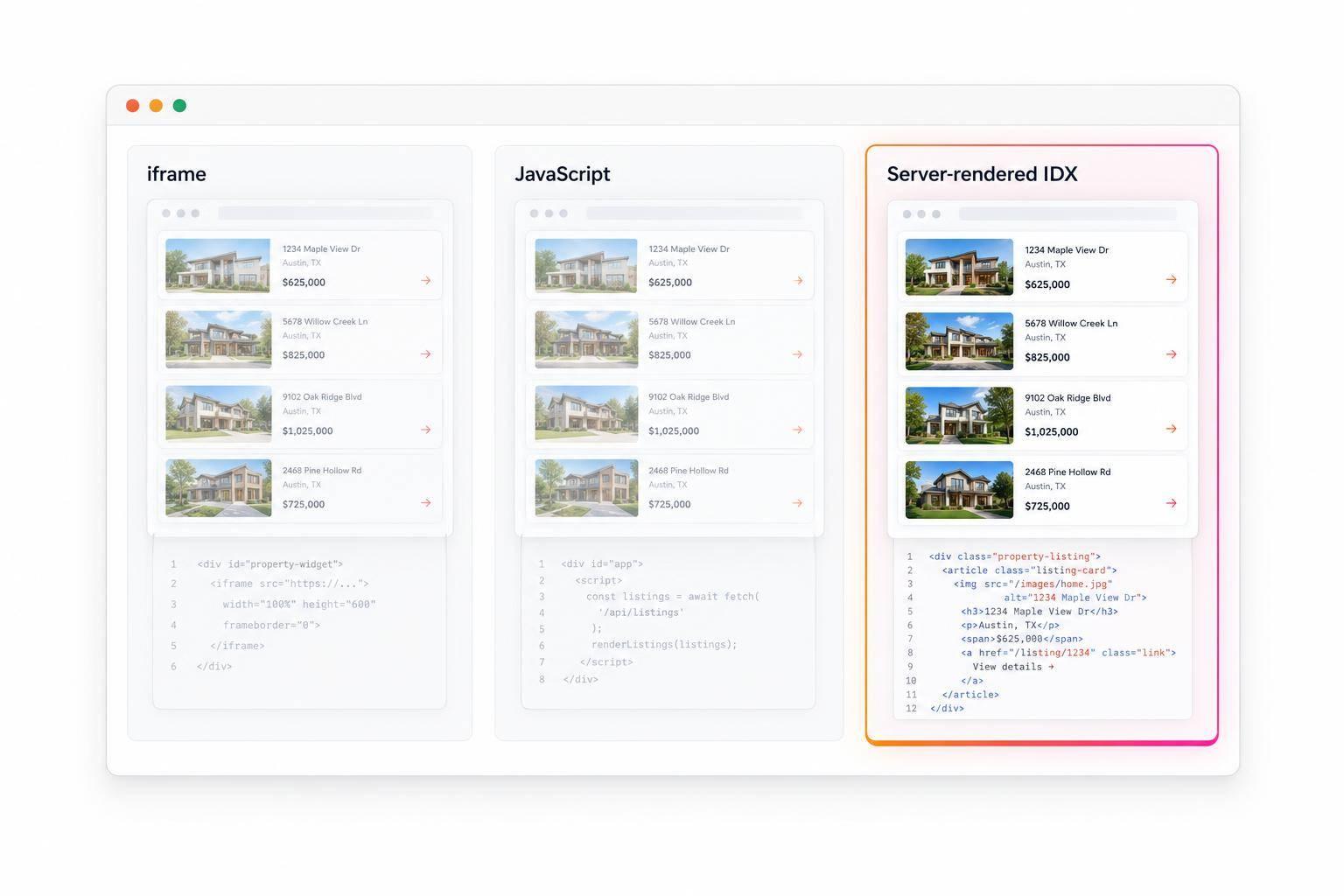
- Iframe IDX puts listings in a separate document. Google may not attribute that content to your page.
- JavaScript IDX relies on scripts and data requests. I check whether listing details and links appear after Google renders the page.
- Server-rendered IDX puts listing details in the initial HTML. It reduces reliance on JavaScript but doesn’t guarantee indexing.
Quick Comparison
| IDX type | How listings arrive | Where property links lead | Main check |
|---|---|---|---|
| Iframe | Separate embedded document | Often the provider’s domain | Inspect the iframe source and property URLs |
| JavaScript | Scripts load listing data | Depends on configuration | Check Google’s rendered HTML |
| Server-rendered | Initial HTML response | Your domain, if configured | Check source HTML and page status |
My next step: compare View Page Source with Search Console’s Test Live URL, then check indexing status, canonical URLs, and crawl access. <u>What Google can render and what Google indexes are two different things.</u>
Iframe vs. JavaScript vs. Server-Rendered IDX: What Google Sees
How Google Search indexes JavaScript sites - JavaScript SEO
Iframe IDX: Embedded Content Is a Separate Document
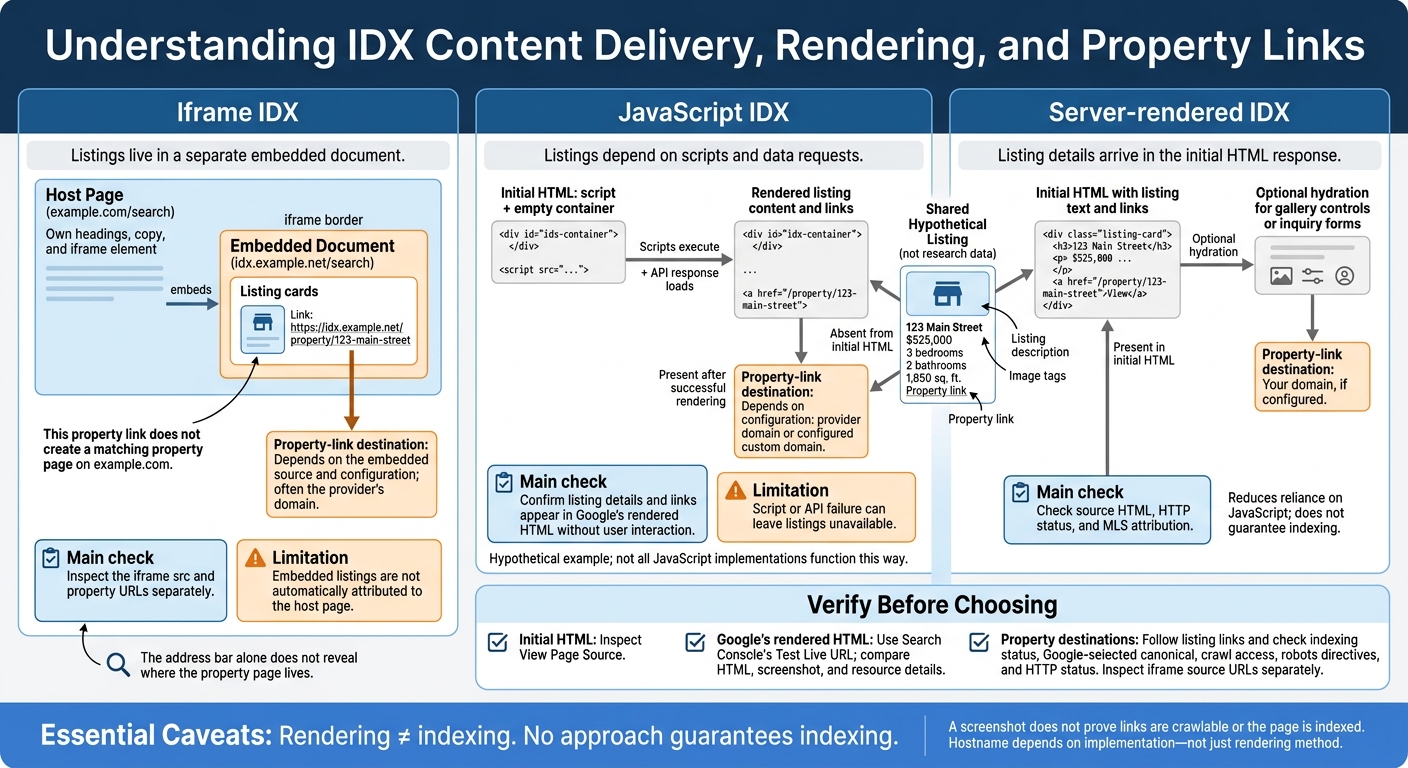
With iframes, follow three URLs: the host page, the iframe source, and the property link inside the frame. This chain shows where the listing content actually lives.
Trace the Host Page, Iframe Source, and Property URL
Hypothetical URL trace:
example.com/searchembedshttps://idx.example.net/search, which links tohttps://idx.example.net/property/123-main-street. Your search page contains its own headings, copy, and iframe element. The embedded document contains the listing cards. That property link does not create a matching property page onexample.com.
Right-click a listing and select Inspect. Find the enclosing <iframe> and check its src attribute. Then check where the property link points. Clicking a link inside an iframe may leave the address bar unchanged, so the address bar alone won’t tell you where the property page lives.
Separate Crawling, Indexing, and Content Attribution
Use this three-URL map to check what Google can discover and which document holds the listings.
| Document | Content location | Potential crawl path | Indexing uncertainty | Host-page attribution |
|---|---|---|---|---|
| Host page | example.com |
Direct discovery | Indexing is not assured | Embedded listings are not automatically included |
| Iframe source | idx.example.net |
Iframe’s src |
May be indexed separately or excluded | Association is possible, not assured |
| Linked property page | idx.example.net |
Link inside the frame | Discovery does not ensure indexing | Creates no property URL on example.com |
Once you’ve located the iframe content, compare that setup with JavaScript-rendered and server-rendered IDX.
Check the iframe source and property URL separately for robots rules, indexing directives, and canonicals. A canonical pointing to the source URL signals the preferred URL. It doesn’t prove Google will attribute the listings to your host page.
Also check for noindex, which excludes the source page from indexing. When paired with noindex, indexifembedded permits indexing of the page’s embedded content - but doesn’t guarantee attribution to the host page.
If the listings aren’t in an iframe, the next test is whether Google can render them from JavaScript or read them in the initial HTML.
JavaScript vs. Server-Rendered IDX: When Listing HTML Loads
JavaScript IDX: Check Rendered Content and Links
example.com/homes-for-salemay return only a<script>tag and an empty container. Google must execute the script and load the API response before it can see 123 Main Street, $525,000, 3 bedrooms, 2 bathrooms, and 1,850 sq. ft.
Check that Google can access scripts and API resources, and that listing details load without user interaction. Property cards need stable links, such as <a href="/property/123-main-street">. Test what happens when requests fail, too. API errors shouldn't produce an empty page or a “Not Found” screen with 200 OK.
Server-Rendered IDX: Check the Initial HTML
With server rendering, the listing content appears in the first response.
For the same hypothetical property, inspect the source of
example.com/property/123-main-street. Server-rendered HTML should already include the address, $525,000 price, property facts, description, and internal links.
Hydration can add gallery controls or inquiry forms while keeping the core listing text in the server-delivered HTML.
Check the HTTP status and confirm that the initial markup includes MLS attribution: the listing agent, office, and logos. If a removed listing's page is gone, return an appropriate 404 or 410 - not a “Not Found” message with 200 OK. For a long-term approach, Google recommends server rendering, static rendering, or hydration rather than dynamic rendering.
Compare Listing Content Before and After Rendering
Use View Page Source to check the original response and Search Console’s rendered HTML to see Google's version. Content that depends on JavaScript must appear in Google's rendered output for Google to use it from that page. But appearing in either output doesn't guarantee indexing.
The table compares what Google can read in the host page's initial HTML, its rendered listing content, and server-delivered listing HTML for this hypothetical property.
| Element | JavaScript initial HTML | JavaScript rendered HTML | Server-rendered initial HTML |
|---|---|---|---|
| Listing title | Absent | 123 Main Street | 123 Main Street |
| Price | Absent | $525,000 | $525,000 |
| Address | Absent | 123 Main Street | 123 Main Street |
| Property facts | Absent | 3 bedrooms, 2 bathrooms, 1,850 sq. ft. | 3 bedrooms, 2 bathrooms, 1,850 sq. ft. |
| Description | Absent | Listing description | Listing description |
| Image | Absent | <img> tags after rendering |
<img> tags in the HTML |
| Property link | Absent | <a href="/property/123-main-street"> |
<a href="/property/123-main-street"> |
Audit Your IDX With Google Search Console
Use Search Console to check which version of your IDX content Google actually receives.
Inspect Live HTML, Screenshots, and Resources
Inspect the host search page and a representative property-detail URL. For each, record the indexing status and Google-selected canonical. Then run Test Live URL and compare the live HTML, screenshot, and resource details with the original source.
Check listing text, prices, property facts, images, and links. Look for failed resources and JavaScript errors in More Info. A screenshot shows how the page looks - it doesn’t prove that links are crawlable or that the page is indexed.
If a destination uses another hostname, you’ll need access to a Search Console property that covers that URL. A Domain property may already cover its subdomains.
Interpret What Google Receives
Classify each page’s listing content based on the results - not just whether the widget looks complete.
| Audit finding | Classification | What it tells you |
|---|---|---|
| Listing content appears in the original HTML | Server-delivered | Google receives it without JavaScript. |
| Content appears only in rendered HTML | JavaScript-dependent | Google sees it only after rendering. |
| Content is absent from rendered HTML | Unavailable in the inspected output | Google cannot use this content from the inspected output. |
| Iframe blocked or required script fails | Separate inspection needed | Check the iframe source or failed resource before drawing conclusions. |
For each property destination, check crawl access, robots directives, HTTP status, and canonical information. An accessible page can still be excluded from indexing, and Google may choose another URL as canonical.
For an iframe, record its src and inspect that separate document. Don’t treat the host page’s screenshot as proof that the iframe’s content belongs to the host page.
Check Your EasyAgentIDX Implementation
For both URLs, document the implementation type, property-link destinations, and test date. For EasyAgentIDX, specify whether you use the standard widget, a custom domain, or an API/Next.js build. Use the same audit to map each property URL to how its content is actually delivered.
Conclusion: Choose Based on Verified Listing Visibility
Test the source, rendered HTML, and Search Console results. Then choose the delivery method that matches what Google can actually see.
The table shows what Google sees first, what needs to load, and where property links point.
| IDX type | What Google sees first | What must load | Where the property link points | Main limitation |
|---|---|---|---|---|
| Iframe | Listings in a separate document | Iframe source | Depends on the embedded source and configuration | Content may not be attributed to the host page |
| JavaScript | Listings usually appear after scripts run | Scripts and API requests | Provider domain by default, or a custom domain if configured | Script or API failure can leave listings unavailable |
| Server-rendered | Listings included in initial HTML | Initial HTML response | Host domain | Implementation complexity; no indexing guarantee |
The hostname depends on how you implement the IDX - not just how it renders.
Choose iframe embedding when fast setup and simple maintenance matter more than verified visibility on your host domain. Choose JavaScript IDX only after confirming that Google can render the content and links. Favor server-rendered HTML when property pages on your own domain take priority. EasyAgentIDX’s modern IDX platform and Next.js starter support this approach.
No approach guarantees indexing. Base your choice on the HTML Google receives and the property URLs your implementation exposes.
FAQs
Why aren't my IDX pages indexed if Google can render them?
Rendering doesn’t guarantee indexing or mean Google will credit your page with the listing content. With iframes, Google may attribute that content to the embedded page instead of your host page. JavaScript widgets that fetch and insert listings after the page loads may also leave Google unable to connect the content to your domain.
Server-rendered HTML puts listing content directly in the page source, reducing its reliance on client-side scripts.
Will switching to server-rendered IDX affect my existing rankings?
Switching to server-rendered IDX can help your search rankings by making listing content easier for Google to crawl and potentially index.
Google often treats iframe content as separate from the page that embeds it. Server-rendered property pages, on the other hand, can sit directly on your domain. Each page can have its own URL, meta description, and schema markup that Google can discover.
How can I keep IDX filters from creating duplicate pages?
Use a consistent canonical URL structure. Embed widgets that display filtered views dynamically on a single host page rather than creating separate URLs for each view.
For custom server-rendered implementations, use the official API and map property search and listing detail routes to canonical URLs. Follow board-specific cache policies and handle listing metadata on the server to keep search engine indexing consistent across your site.