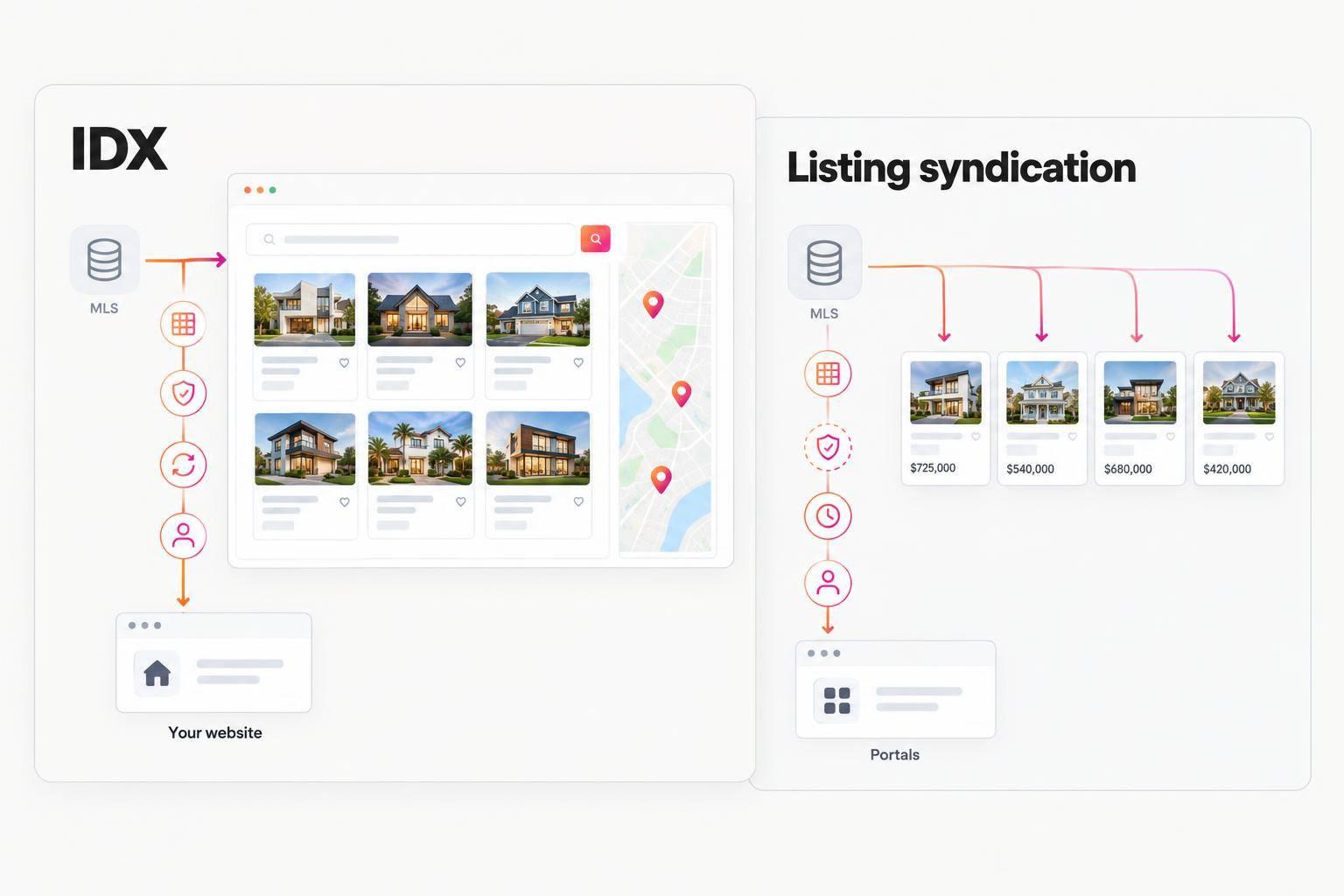
IDX puts MLS property search on your brokerage’s website. Listing syndication sends approved listings to third-party sites like Zillow and Realtor.com. I’d check permissions and test where inquiries go before enabling either one.
The same home can appear in both places - but its details, update timing, and contact forms may differ. Permission for one channel does not mean permission for the other.
Quick Comparison
| What I’d check | IDX | Listing syndication |
|---|---|---|
| Purpose | Search on your brokerage’s site | Exposure on external sites |
| Data source | MLS listings approved for IDX | Broker, MLS, or approved provider |
| Permission | MLS and IDX approval | Distribution and destination approval |
| Display control | Brokerage, within MLS rules | Third-party site |
| Update timing | MLS feed and website processing | Feed delivery and portal processing |
| Inquiry routing | Hosting brokerage’s workflow | Portal’s contact arrangements |
Timing matters, too: the article’s cited NAR guidance sets an IDX update interval of at least every 12 hours, while Zillow says MLS corrections can take up to 24 hours to appear. Those are not promises that every site will match at once.
My checklist: <u>confirm seller instructions, check each channel’s permissions, correct the source record, and send test inquiries.</u> Then label website and portal leads separately in your CRM so you can track where each inquiry starts.
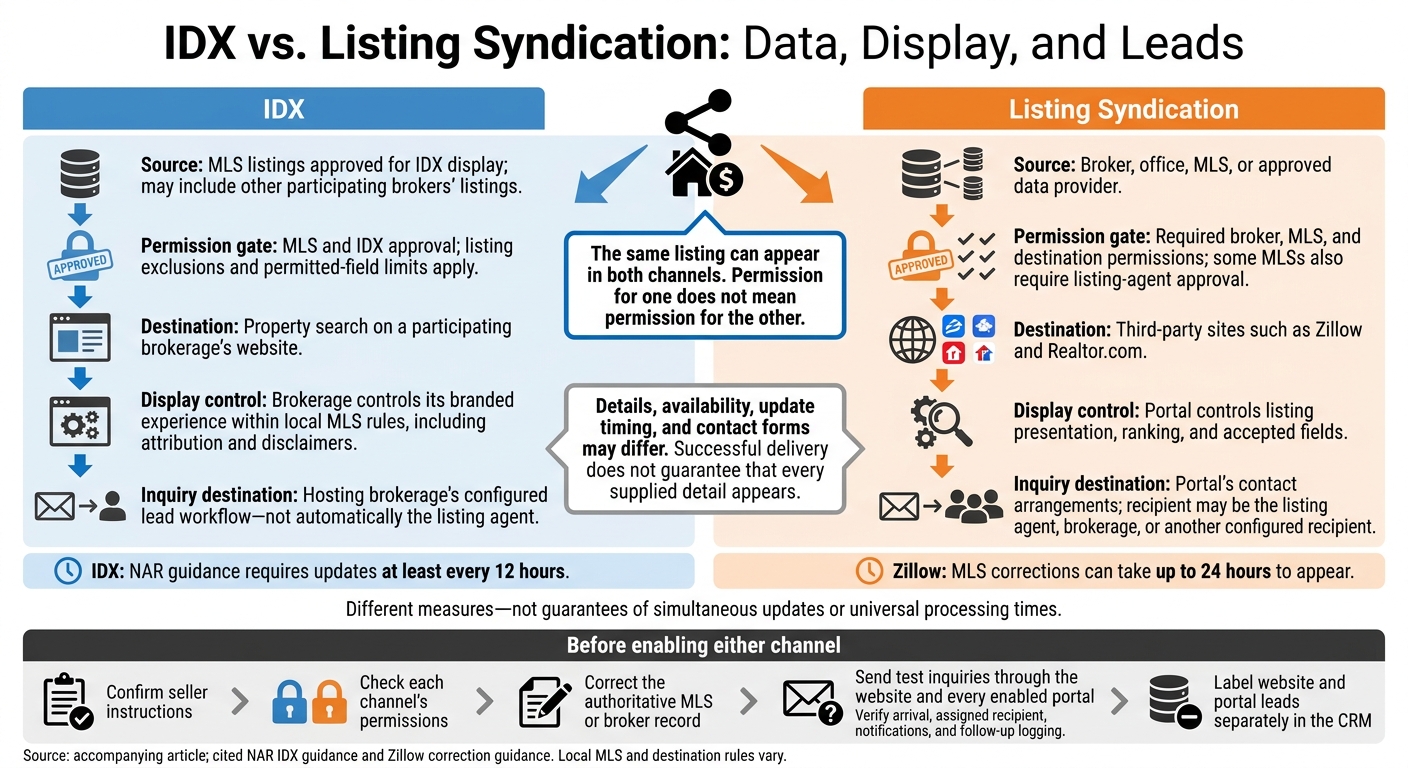
IDX vs. Listing Syndication: Data, Display, and Leads
Bright MLS Revealed: Syndication and IDX | Bright MLS
IDX vs. Listing Syndication at a Glance
| Comparison point | IDX | Listing syndication |
|---|---|---|
| Primary purpose | Property search on a participating broker’s website | Exposure on third-party sites |
| Listing source | MLS data approved for IDX display | Broker, office, MLS, or approved data provider |
| Permissions | MLS and IDX approval | Required broker, MLS, and destination permissions |
| Display control | Brokerage controls its branded experience within MLS rules | Portal controls how listings appear |
| Updates | MLS feed updates and website processing | Destination-specific feeds and processing |
| Where buyers see it | Brokerage website | External portal |
| Lead destination | Brokerage’s lead form and routing | Destination’s inquiry process and routing arrangements |
The same listing can appear in both channels, but each has its own permissions, feed, and lead-routing rules. The next section explains where each channel gets its data and why updates may appear at different times.
How Listing Data Reaches Each Channel
IDX: MLS Listings on a Brokerage Website
A broker joins the MLS, signs the IDX agreement, and connects through the MLS or an approved provider. This connection can include other participating brokers’ listings. But MLS access does not mean unrestricted redistribution rights: listing exclusions and limits on permitted fields still apply.
The broker must control the display and clearly identify the brokerage. Even with a technology provider, the brokerage controls the search experience and must follow local MLS compliance rules for attribution, disclaimers, and display.
The same listing can also reach other sites through a separate syndication feed.
Syndication: Listings on External Sites
A broker, office, MLS, or authorized provider sends approved listings to selected destinations through a separate feed. Some MLSs require approval from both the broker and the listing agent before syndicating a listing.
Portals accept approved feeds from MLSs, brokers, or authorized providers. They control how listings appear, how they rank, and where inquiries go. Check which feeds, fields, and property types each destination accepts. Successful delivery doesn't guarantee that every supplied detail will appear.
Because each portal controls its display process, changes may appear at a different time than they do on the brokerage site.
Why Updates and Availability Can Differ
Feed schedules, cached content, field limits, permissions, and destination rules all affect when changes to prices, statuses, photos, and remarks appear. NAR’s cited IDX guidance requires updates at least every 12 hours. That does not mean listings update everywhere at the same moment - or that the same property will look identical on a brokerage website and a portal.
If something is wrong, correct the authoritative MLS or broker record first, then check permissions and feed delivery.
The Same Property on a Brokerage Website and a Portal
The same listing can look different depending on where a buyer starts - and where their inquiry goes.
A Buyer Uses the Brokerage’s IDX Search
Hypothetical example: Jordan searches a brokerage’s IDX website for Austin, Texas, homes priced up to $500,000, with at least three bedrooms and 1,800 square feet, and opens an authorized MLS result priced at $475,000 with three bedrooms and 1,850 square feet. The page uses the hosting brokerage’s branding and displays MLS-approved property details.
Jordan submits a showing request through the brokerage’s form. The lead goes to the hosting brokerage’s workflow, not the listing side. The form should clearly identify the hosting brokerage.
A Buyer Views the Same Listing on a Portal
The same listing reaches a portal through syndication.
Jordan later finds the same home on Zillow through authorized distribution. Before sending an inquiry, Jordan should confirm who receives the lead.
| Comparison | Brokerage IDX page | Property portal |
|---|---|---|
| Branding | Hosting brokerage’s website and contact experience | Portal’s layout, branding, and search ranking |
| Buyer actions | Filter results, save homes, request a showing | Compare homes, save listings, use portal contact prompts |
| Contact routing | Hosting brokerage’s configured lead workflow | Listing agent, brokerage, or another configured recipient |
| Refresh timing | MLS refresh rules | Portal processing schedule |
If the price drops from $475,000 to $465,000 and then changes to pending, the brokerage site may update before the portal. Zillow says MLS corrections can take up to 24 hours to syndicate.
If a listing appears in only one channel, check its permissions and source record before assuming it’s unavailable.
Conclusion: Use IDX for Search and Syndication for Exposure
IDX keeps search on the brokerage site. Syndication sends listings to third-party portals. Each has a different job.
Set Up Website Search and Lead Capture
Once you’ve defined both channels, use IDX to power the brokerage site’s branded search, saved searches, alerts, and lead capture.
IDX requires MLS approval, compliance with local display rules, and proper attribution. That approval does not grant permission to syndicate listings to external portals.
Manage Distribution and Track Each Channel
Keep syndication separate from website search so you can track each source on its own.
Keep the MLS record accurate so IDX and syndicated pages pull current prices, listing status, photos, and contact details. Review permissions for IDX and syndication separately, including seller opt-outs and destination exclusions.
Before launch, send separate test inquiries through the website and every enabled portal. Check that each inquiry arrives, reaches the assigned agent, triggers notifications, and gets logged for follow-up. Use separate CRM source labels for website leads and portal leads.
FAQs
Can I use IDX without syndicating my listings?
Yes. IDX and listing syndication are separate processes. You can use IDX to display permitted MLS listings on your website for public search and lead capture without sending your brokerage’s listings to third-party portals like Zillow or Realtor.com.
You control your website’s IDX settings separately from your listing syndication choices.
What should I do if a listing stays outdated?
Check that your MLS-approved connection is active and your integration token is current. Updates may not appear right away, so check your board’s refresh schedule. Also, make sure your MLS has active listings that match your site’s filters.
Still having trouble? Confirm that your account plan includes the features you need. Then contact your provider with the listing number, page URL, and test time so they can troubleshoot.
How can I compare IDX and syndication lead quality?
Compare engagement and conversion rates. Track saved searches, property views, and registrations on your IDX website to spot high-intent leads. Syndication portals reach more people, but you have less control over how listings appear and how you collect leads.
Check how well leads from each source flow into your CRM. Then compare which inquiries lead to property viewings or appointments to see which channel brings in more qualified prospects.