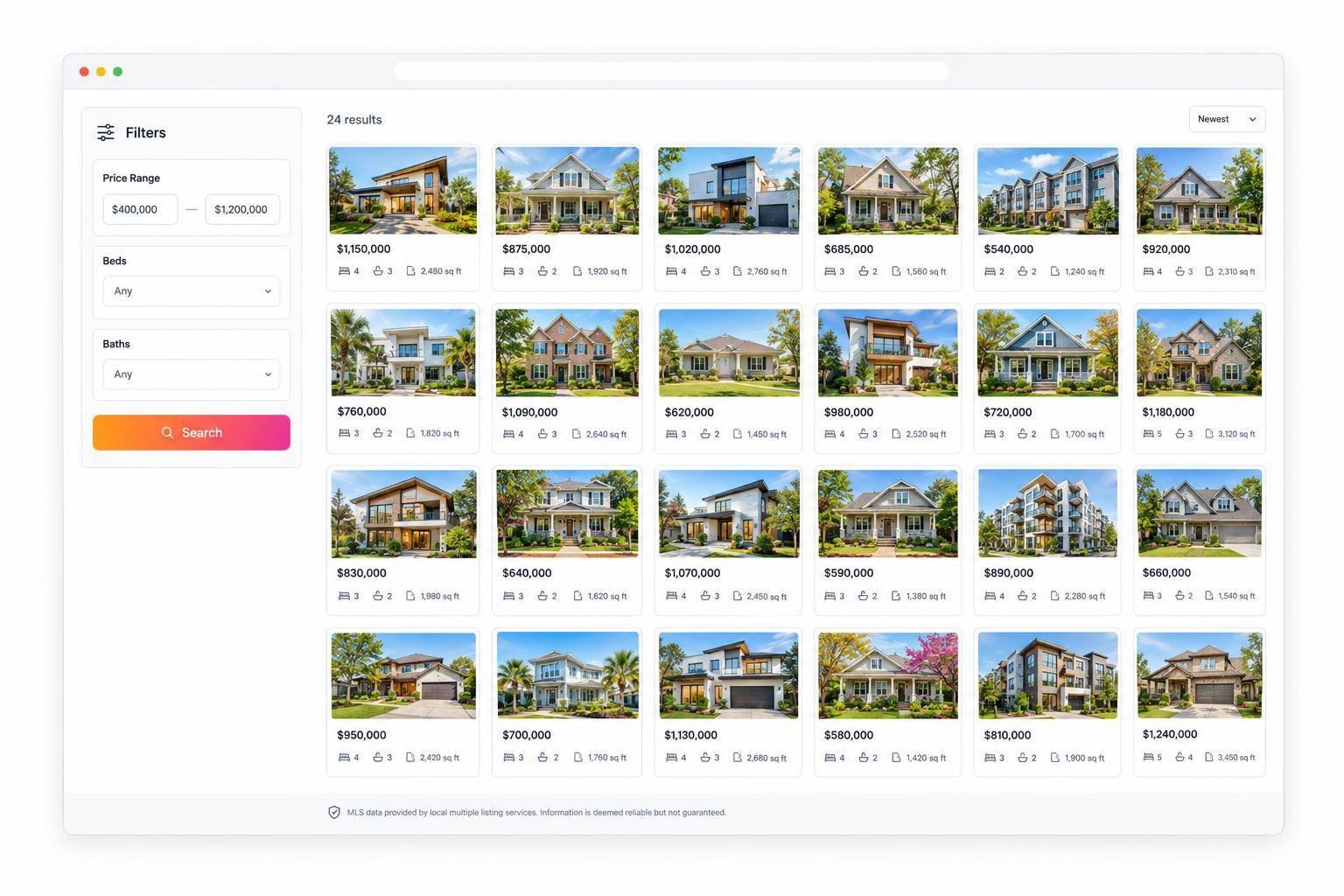
IDX for Next.js: Build a Custom MLS Property Search
I build MLS search in Next.js by keeping API credentials on the server and listing permissions at the center of the app. Before coding, I confirm MLS approval and API access. Then I validate filters, cap searches at 24 listings per request, and keep caching off until MLS rules permit it.
Here’s the approach I cover:
- Keep location, price, beds, baths, and pagination in shareable URLs.
- Return only approved listing fields, with required attribution.
- Render property pages on the server and hide records that can no longer be displayed.
- Handle empty results, errors, and timeouts without exposing secrets.
- Test security, mobile layouts, and MLS display rules before launch - and monitor the feed afterward.
My rule: a working search isn’t enough. <u>It also needs to protect credentials and follow MLS display rules.</u>
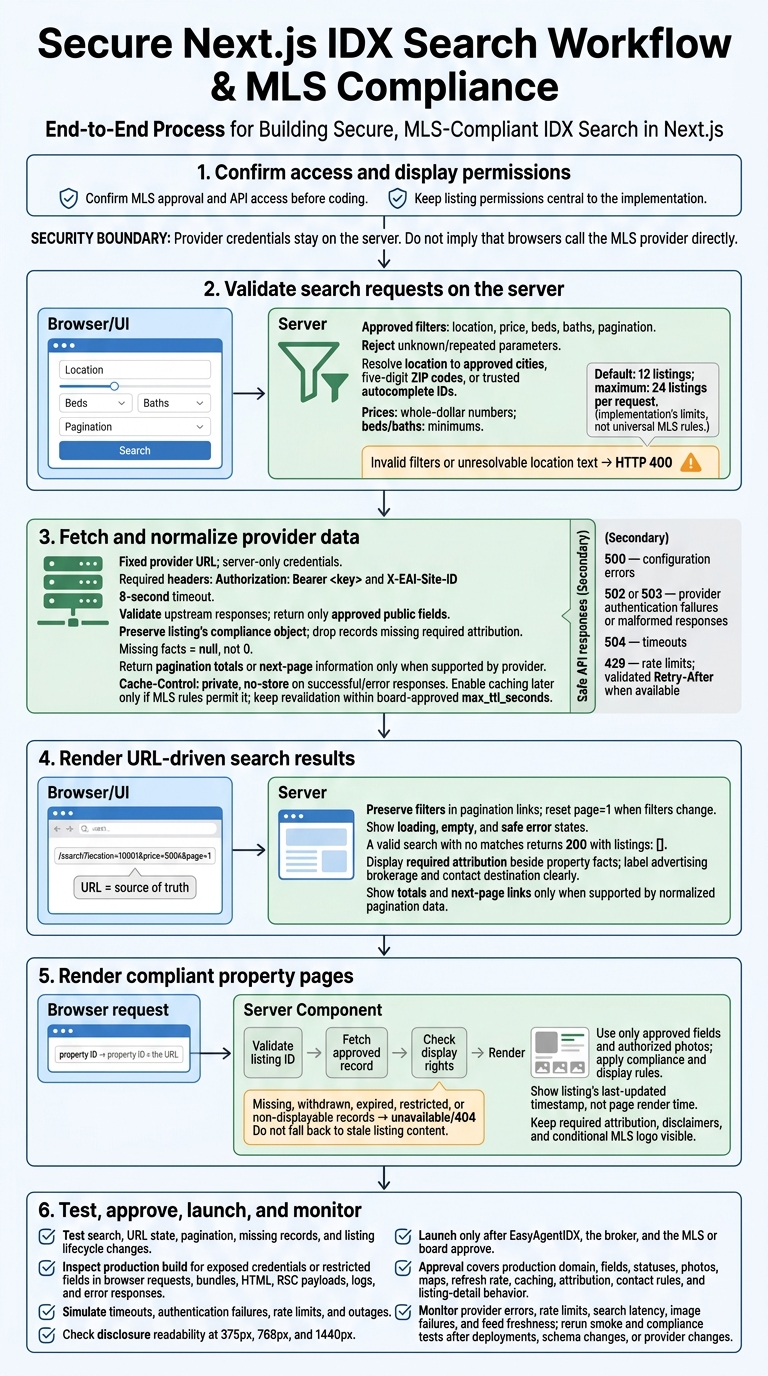
Secure Next.js IDX Search: From Approval to Launch
Build a Secure Listings Endpoint
With server-side access in place, validate filters before sending them to the MLS.
Validate Search Filters and Pagination
Use Zod to validate every query parameter. Accept prices as whole-dollar numbers, not currency-formatted strings, and treat beds and baths as minimums. Set a server-side cap of 24 listings per request. Reject unknown or repeated parameters before making an upstream request.
The route should allow only approved filters:
// app/api/listings/route.ts
import { z } from "zod";
import {
  resolveApprovedLocation,
  searchProvider,
  normalizeProviderResponse,
  mapProviderError,
} from "@/lib/idx/search";

const numeric = (schema: z.ZodNumber) =>
  z.string()
    .regex(/^\d+(?:\.\d+)?$/)
    .transform(Number)
    .pipe(schema);

const SearchSchema = z.object({
  location: z.string().trim().min(1).max(100).optional(),
  minPrice: numeric(z.number().int().nonnegative()).optional(),
  maxPrice: numeric(z.number().int().nonnegative()).optional(),
  beds: numeric(z.number().int().min(0).max(20)).optional(),
  baths: numeric(z.number().min(0).max(20)).optional(),
  page: numeric(z.number().int().min(1)).default(1),
  limit: numeric(z.number().int().min(1).max(24)).default(12),
}).strict().refine(
  ({ minPrice, maxPrice }) =>
    minPrice === undefined ||
    maxPrice === undefined ||
    minPrice <= maxPrice,
  { message: "minPrice cannot exceed maxPrice" },
);

export async function GET(request: Request) {
  const params = new URL(request.url).searchParams;
  const seen = new Set<string>();
  let repeated = false;

  params.forEach((_, key) => {
    if (seen.has(key)) repeated = true;
    seen.add(key);
  });

  const parsed = SearchSchema.safeParse(Object.fromEntries(params));
  const headers = { "Cache-Control": "private, no-store" };

  if (repeated || !parsed.success) {
    return Response.json(
      { error: { code: "INVALID_FILTERS" } },
      { status: 400, headers },
    );
  }

  try {
    const filters = parsed.data;
    const location = await resolveApprovedLocation(filters.location);
    const query = new URLSearchParams({
      page: String(filters.page),
      per_page: String(filters.limit),
    });

    if (location !== undefined) query.set("location", location);

    const mappings = [
      ["minPrice", "min_price"],
      ["maxPrice", "max_price"],
      ["beds", "min_beds"],
      ["baths", "min_baths"],
    ] as const;

    for (const [appKey, providerKey] of mappings) {
      const value = filters[appKey];
      if (value !== undefined) query.set(providerKey, String(value));
    }

    const upstream = await searchProvider(query);
    return Response.json(
      normalizeProviderResponse(upstream, filters),
      { headers },
    );
  } catch (error) {
    return mapProviderError(error, headers);
  }
}
Keep these helpers in lib/idx/search.ts and call them only from the route handler. Have resolveApprovedLocation accept only approved cities, five-digit ZIP codes, or trusted autocomplete IDs. Resolve those IDs to approved MLS location values, and return HTTP 400 for text that can't be resolved. Keep the provider URL fixed in server configuration so only the validated parameters above reach it.
After validating the request, convert the provider’s output into a response shape your app controls.
Normalize Listings and Pagination Data
Have normalizeProviderResponse validate the upstream payload before returning data to the UI. Map only approved public fields, pass through each listing’s compliance object unchanged, and drop records missing required attribution.
Use null for missing facts - not 0. Leave currency, address, and date formatting to the UI. Return totalCount or hasNextPage only when the provider supplies them; the number of cards returned doesn't tell you whether another page exists.
type ListingsResponse = {
  listings: Array<{
    id: string;
    address: {
      street?: string;
      city: string;
      state: string;
      postalCode?: string;
    };
    price: number | null;
    beds: number | null;
    baths: number | null;
    squareFeet: number | null;
    status: string | null;
    primaryImage: string | null;
    attribution: string;
    compliance: Record<string, unknown>;
  }>;
  pagination: {
    page: number;
    limit: number;
    totalCount?: number;
    hasNextPage?: boolean;
    nextPage?: number;
  };
};
Next, map upstream failures to consistent API responses.
Handle Errors and Control Data Caching
Inside searchProvider, attach the required Authorization: Bearer <key> and X-EAI-Site-ID headers. Enforce an 8-second timeout with an abort signal, check the HTTP status before parsing JSON, and validate the response shape.
Have mapProviderError return safe JSON error codes with these HTTP statuses:
- 500 for configuration errors.
- 502 or 503 for provider authentication failures or malformed responses.
- 504 for timeouts.
- 429 for rate limits, with a validated
Retry-Aftervalue when available.
Keep sanitized logs with the request ID, latency, and status. Never log credentials or raw provider payloads. A valid search with no matches should return 200 with listings: []. Handle loading in the client, not in this endpoint.
Set Cache-Control: private, no-store on both successful and error responses. Current Next.js Route Handlers aren't cached by default, but explicit settings avoid relying on behavior that may change between versions. If you enable caching later, keep revalidation within the board-approved max_ttl_seconds. Revalidating this Route Handler may not immediately clear an open browser’s cached payload.
Build URL-Based Filters and Search Results
Keep Search Filters in the URL
Make the URL the source of truth for search state. Submit filter changes with router.push() so Back and Forward restore previous searches. The form should also restore its values after navigation.
// app/homes/SearchFilters.tsx
"use client";

import Link from "next/link";
import { useRouter, useSearchParams } from "next/navigation";
import { useTransition } from "react";

const fields = [
  ["location", "City or ZIP code", "text"],
  ["minPrice", "Minimum price ($)", "number"],
  ["maxPrice", "Maximum price ($)", "number"],
  ["beds", "Minimum bedrooms", "number"],
  ["baths", "Minimum bathrooms", "number"],
] as const;

export function SearchFilters() {
  const current = useSearchParams();
  const router = useRouter();
  const [pending, startTransition] = useTransition();

  return (
    <form
      key={current.toString()}
      className="search-filters"
      onSubmit={(event) => {
        event.preventDefault();
        const data = new FormData(event.currentTarget);
        const params = new URLSearchParams();

        for (const [name] of fields) {
          const value = String(data.get(name) ?? "").trim();
          if (value) params.set(name, value);
        }

        params.set("page", "1");
        startTransition(() => {
          router.push(`/homes?${params.toString()}`);
        });
      }}
    >
      {fields.map(([name, label, type]) => (
        <label key={name}>
          {label}
          <input
            name={name}
            type={type}
            min={type === "number" ? 0 : undefined}
            step={type === "number" ? (name === "baths" ? "0.5" : "1") : undefined}
            defaultValue={current.get(name) ?? ""}
          />
        </label>
      ))}
      <button type="submit" disabled={pending}>Search homes</button>
      <Link href="/homes?page=1">Clear filters</Link>
      <span role="status" aria-live="polite">
        {pending ? "Updating results…" : ""}
      </span>
    </form>
  );
}
Adding location autocomplete? Call a protected server route after a 250–300 ms debounce, and require at least two or three characters. Cancel stale requests with AbortController. Submit the selected normalized location value or ID - not its display label. After the URL changes, the page can fetch the normalized response and show matching results.
Show Listing Cards and Pagination Links
Build cards from the normalized listing data in the filtered response. Use the approved listing ID for detail links and follow address-display permissions. Leave missing facts blank or label them “Not available.”
In the client results component, use useSearchParams() to keep filters in pagination links. Show totals or a next-page link only when the normalized response provides that information.
const current = useSearchParams();
const dollars = new Intl.NumberFormat("en-US", {
  style: "currency",
  currency: "USD",
  maximumFractionDigits: 0,
});
const numbers = new Intl.NumberFormat("en-US");
const totalPages = pagination.totalCount === undefined
  ? undefined
  : Math.max(1, Math.ceil(pagination.totalCount / pagination.limit));
const hasNextPage = pagination.hasNextPage ??
  (totalPages !== undefined && pagination.page < totalPages);

function pageHref(page: number) {
  const next = new URLSearchParams(current.toString());
  next.set("page", String(page));
  return `/homes?${next.toString()}`;
}

// Results summary
{pagination.totalCount !== undefined && (
  <p>{numbers.format(pagination.totalCount)} homes found</p>
)}

// Inside the listing grid:
<article className="listing-card">
  {listing.primaryImage ? (
    <img src={listing.primaryImage} alt="Property photo" />
  ) : (
    <p>Photo unavailable</p>
  )}
  <h2>
    <Link href={`/listings/${encodeURIComponent(listing.id)}`}>
      {[
        listing.address.street,
        listing.address.city,
        [listing.address.state, listing.address.postalCode]
          .filter(Boolean).join(" "),
      ].filter(Boolean).join(", ")}
    </Link>
  </h2>
  <p>{listing.price === null ? "Price unavailable" : dollars.format(listing.price)}</p>
  {listing.status ? <p>{listing.status}</p> : null}
  <p>
    {[
      listing.beds !== null ? `${listing.beds} beds` : null,
      listing.baths !== null ? `${listing.baths} baths` : null,
      listing.squareFeet !== null
        ? `${numbers.format(listing.squareFeet)} sq ft`
        : null,
    ]
      .filter(Boolean)
      .join(" · ")}
  </p>
  <MlsLogo />
  <ListingAttribution compliance={listing.compliance} />
</article>

// After the grid:
<nav aria-label="Search results pages">
  {pagination.page > 1 && (
    <Link href={pageHref(pagination.page - 1)}>Previous page</Link>
  )}
  <span aria-current="page">
    Page {pagination.page}
    {totalPages !== undefined ? ` of ${totalPages}` : ""}
  </span>
  {hasNextPage && (
    <Link href={pageHref(pagination.nextPage ?? pagination.page + 1)}>
      Next page
    </Link>
  )}
</nav>
Add an active-filter summary with removal links that reset page=1. Include a loading skeleton, a “No homes match these filters” message that gives users a next step, and a safe error message with Retry. Format prices as $425,000 and area as 1,850 sq ft. Use a responsive grid, and let agents customize colors and typography.
Add Attribution and Clear Contact Labels
Place the required MLS attribution beside the property facts on every card. Show approved listing-office and agent identification, using the listing’s compliance data to control required logos and wording.
Identify the advertising brokerage separately. If the contact destination differs from the listing agent, label it explicitly. Keep these disclosures visible - not hidden behind hover interactions - and check readability at 375px, 768px, and 1440px before launch.
Build Server-Rendered Property Pages
Once each search result card links to a listing by ID, use that same canonical ID to render the property’s detail page.
Fetch Listings by ID and Handle Missing Records
Make app/listings/[listingId]/page.tsx a Server Component. Fetch the listing through a server-only helper that validates the ID before sending a request.
// app/listings/[listingId]/page.tsx
import { notFound } from "next/navigation";
import { getListingById } from "@/lib/mls/server";
import { ListingDetails } from "./ListingDetails";

export default async function ListingPage({
  params,
}: {
  params: Promise<{ listingId: string }>;
}) {
  const { listingId } = await params;
  const listing = await getListingById(listingId);

  if (
    !listing ||
    listing.displayable !== true ||
    ["WITHDRAWN", "EXPIRED", "RESTRICTED"].includes(listing.status)
  ) {
    notFound();
  }

  return <ListingDetails listing={listing} />;
}
Reuse the server-only credentials in lib/mls/server.ts. Request only the approved listing endpoint, include the required headers, and set cache: "no-store". Validate IDs before making requests, and never let callers supply an arbitrary upstream URL.
Return null for missing records, and treat withdrawn, expired, and restricted listings as unavailable. For temporary upstream failures, throw a safe error so the error boundary can show Retry. Add app/listings/[listingId]/not-found.tsx with a neutral unavailable message and a link back to search. Don’t fall back to stale listing content.
Show Property Facts, Photos, and Attribution
After the record passes availability checks, build the full property page from the same approved record used for the search result card. Render only MLS-approved fields.
Include price, status, address, beds, baths, square footage, lot size, property type, and description. Leave missing values empty and preserve the precision supplied by the source. Render descriptions as plain text unless sanitized HTML is explicitly allowed.
Show the listing’s last-updated timestamp - not the page’s render time. Format it with an explicit U.S. time zone, such as Intl.DateTimeFormat("en-US", { dateStyle: "long", timeStyle: "long", timeZone: "America/New_York" }).
Use only photo URLs authorized by the IDX provider. Follow its image-hosting, caching, watermark, and resizing rules, and enable image optimization only when MLS rules permit it. Apply listing compliance flags and site-level display rules before rendering any images.
Keep required photo attribution visible with the gallery. Place ListingAttribution, ComplianceDisclaimer, and DataLastUpdated near it, along with MlsLogo when show_idx_logo is true.
Test and Launch Your MLS Search
Once the endpoint, results, and property pages are built, test them before launch.
Automate Search, Security, and Compliance Tests
Check the search endpoint, URL filters, pagination, and listing-detail routes. Test location, price, beds, baths, pagination, empty results, and URL state - both separately and together. Confirm malformed inputs fail, page changes work, and editing filters resets the page to 1. Check detail links and 404 behavior for missing, removed, or unauthorized listings.
Run security checks against a production build. Inspect browser requests, JavaScript bundles, HTML, RSC payloads, logs, and error responses for credentials or restricted fields. Browser-visible code must contain no provider calls, secrets, or restricted fields. Simulate timeouts, auth failures, rate limits, and outages. Error messages should remain useful without exposing sensitive data.
Test attribution, contact actions, permitted statuses, and hidden addresses on mobile and desktop. Check listing lifecycle changes, too: records must disappear or be hidden when display rights end or the API stops returning them.
Use the test results to clear the launch review.
Complete the Launch Approval Checklist
After technical tests pass, confirm production approval and operating limits before publishing.
Launch only after EasyAgentIDX, the broker, and the MLS or board approve the production domain, allowed fields, statuses, photos, maps, refresh rate, caching, attribution, contact rules, and listing-detail behavior.
Review maps, carousels, contact forms, saved searches, alerts, and analytics before enabling them. Keep attribution intact, confirm who receives inquiries, and keep restricted fields and stale listings out of emails and tracking tools.
After launch, monitor provider errors, rate limits, search latency, image failures, and feed freshness. Rerun smoke and compliance tests after any deployment, schema change, or provider change.
FAQs
How can I make IDX property pages SEO-friendly?
Use the platform’s structured metadata. In Next.js, render required compliance fields directly on the page: listing attribution, office and agent details, and mandatory legal disclaimers.
Keep structured data aligned with current property information. Don’t present facts as current for unavailable or outdated listings. Use the authoritative API response as your source, and revalidate pages within your MLS board’s required cache lifetime to maintain compliance.
How do I prevent abuse of my public search endpoint?
Use server-side Redis rate limiting to control request frequency. Route all API calls through authenticated server components or route handlers. Store your API key in server-side environment variables - never expose it to clients.
Require an email address before showing full search results to help limit scraping and abuse. Set cache lifetimes according to your board-specific compliance rules to help reduce load.
How can I keep open search results current?
Follow your MLS board’s cache rules. Call GET /api/v1/platform/compliance to get max_ttl_seconds, then revalidate and update cached pages within that limit. Always fetch authoritative listing data directly from the API before rendering it.
Use no-store headers for dynamic server-side listing responses. Immediately remove or hide a listing if the API stops returning its record or its display rights have expired.