IDX Approval Explained: Requirements, Timeline, and MLS Compliance
IDX Approval Explained: Requirements, Timeline, and MLS Compliance
Before you display MLS listings, get written approval and confirm your MLS connection shows “Approved.” I’d start by checking eligibility, broker consent, vendor requirements, and every website URL you plan to use.
Here’s what to plan for:
- Paperwork: Submit the required agreements, MLS IDs, broker details, and domains.
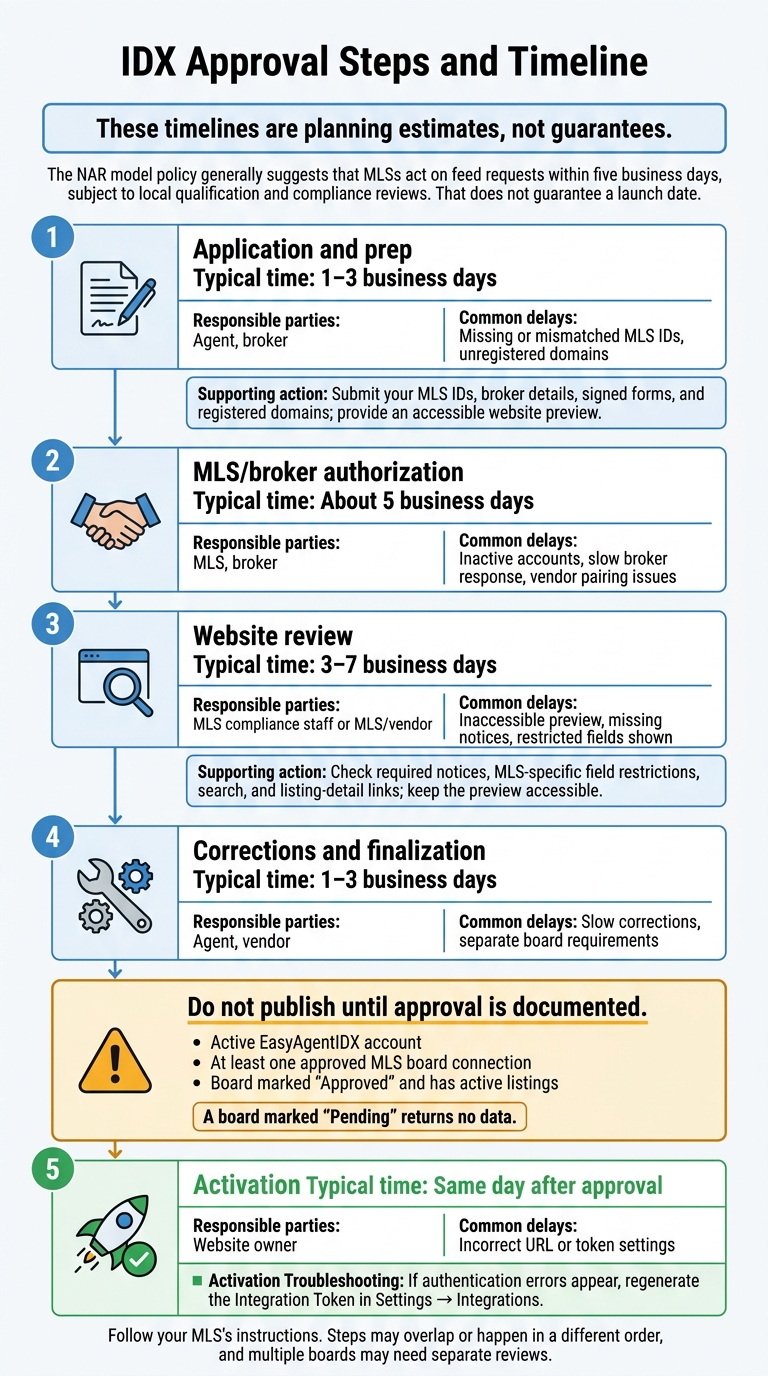
- Review time: Allow about 5 business days for MLS/broker authorization and 3–7 business days for website review. These are estimates, not launch promises.
- Display rules: Follow your MLS compliance requirements for attribution, disclaimers, listing updates, and public fields.
- Launch checks: In EasyAgentIDX, confirm your account and board connection are active, then test listing links, settings, and lead routing.
My rule: <u>approval comes before publishing</u>. After launch, recheck your setup whenever your site, domain, or integration changes.
IDX Eligibility, Agreements, and Vendor Approval
Check Agent Eligibility and Broker Consent
Before submitting, check your active MLS status, brokerage affiliation, signer role, and whether your records match. Follow your MLS’s exact license and membership rules. Do not assume REALTOR® membership is required.
| Role | Approval responsibility |
|---|---|
| Agent | Check eligibility and MLS records; complete required subscriber forms. |
| Broker | Authorize the request; sign applicable participant agreements and data-use licenses; oversee agent compliance. |
| MLS | Set requirements, verify eligibility, review the site, and authorize access. |
| Vendor - EasyAgentIDX | Complete vendor forms and connect the feed. |
| Website owner | Provide approved display URLs and access for review. |
Sign Required Agreements and Register Domains
Gather the current participant or subscriber agreement, broker consent, data-use license, vendor forms, and website registration documents. Use the signer roles listed on your MLS forms. Some data-use agreements require signatures from both the MLS and the vendor.
Include every domain, subdomain, staging URL, and team site in your request. Ask which need separate registration or approval. Approval for one domain doesn’t automatically cover another. Enter the correct website URL in EasyAgentIDX settings so listing-detail links lead to the intended site.
| Requirement | What can differ by MLS | Confirm before submission |
|---|---|---|
| Agreements | Digital signatures, portal submission, PDFs, or paper forms | Current form version, required signers, and submission method |
| Vendor arrangement | Separate vendor authorization, a data license, or a multiparty agreement | Whether EasyAgentIDX must sign or submit documents |
| Domain registration | Primary-domain limits or separate approval for subdomains and staging sites | Every URL covered by the request |
| Website review | Pre-launch inspection or audits after activation | Required review access and whether staging is acceptable |
Save the MLS instructions with your application documents.
Confirm EasyAgentIDX Support for Your MLS
Before preparing forms, confirm your board, feed arrangement, vendor authorization, licensing requirements, and who submits each document. If you’re requesting access to multiple MLSs, check these details separately for each board.
Once eligibility, agreements, and domains are confirmed, proceed to submission and website review.
IDX Approval Steps and Timeline
IDX Approval Timeline: From Application to Activation
Submit Your Application and Prepare the Website
Submit your MLS IDs, broker details, signed forms, and registered domains. Give reviewers an accessible preview and your website URL so approved listing-detail links can be created. Install the IDX widgets on the approved site. Add required notices and account for any MLS-specific field restrictions.
Plan for Review Time and Common Delays
These timelines are planning estimates, not guarantees. Follow your MLS’s instructions. Steps may overlap or happen in a different order, and multiple boards may need separate reviews.
| Stage | Responsible parties | Typical time | Common delays |
|---|---|---|---|
| Application and prep | Agent, broker | 1–3 business days | Missing or mismatched MLS IDs, unregistered domains |
| MLS/broker authorization | MLS, broker | About 5 business days | Inactive accounts, slow broker response, vendor pairing issues |
| Website review | MLS compliance staff or MLS/vendor | 3–7 business days | Inaccessible preview, missing notices, restricted fields shown |
| Corrections and finalization | Agent, vendor | 1–3 business days | Slow corrections, separate board requirements |
| Activation | Website owner | Same day after approval | Incorrect URL or token settings |
The NAR model policy generally suggests that MLSs act on feed requests within five business days, subject to local qualification and compliance reviews. That does not guarantee a launch date.
Pass Website Review and Activate IDX
Before review, check broker approval, registered domains, your website URL, required notices, and MLS-specific field restrictions. Test search and listing-detail links, keep the preview accessible for inspection, and make requested corrections promptly.
Once the MLS review is complete, check that everything is ready for live display by following the quickstart guide.
Do not publish until approval is documented. EasyAgentIDX requires an active account and at least one approved MLS board connection before users can view or search listings. A board marked “Pending” returns no data.
After approval, confirm that the board is marked “Approved” and has active listings. If you encounter authentication errors, regenerate the Integration Token in Settings → Integrations.
Before publishing, check attribution, disclaimers, refresh timing, and field limits.
MLS Listing Display Rules
Once approval is active, the live site must follow MLS display rules. Brokerages remain responsible for compliance, including custom layouts, API integrations, and AI-generated carousels, or compare IDX platforms to see how different providers handle these features.
Show Required Attribution and Disclaimers
Check your MLS requirements for listing brokerage identification, MLS numbers, copyright notices, accuracy disclaimers, and MLS branding. Use the required wording and placement. If attribution must appear beside property details, a separate legal page won’t meet that rule.
| Requirement | Compliant display | Common failure |
|---|---|---|
| Attribution | Listing brokerage name and MLS number appear beside property details. | Brokerage attribution appears only on a separate legal page. |
| Disclaimers | The property page includes the required accuracy statement, copyright notice, and branding in the required location. | A generic footer replaces the required wording or leaves out branding. |
| Status accuracy | Search results show the current MLS status. | Pending or withdrawn listings appear as active. |
| Field restrictions | Only public fields appear. | Restricted fields appear publicly. |
Keep Listings Updated and Hide Restricted Fields
Compliance covers both what you display and how soon you update it. Listings must update in real time or within the MLS-required refresh window. Status changes must match the MLS feed without delay. Withdrawn or sold listings should not still appear as active.
Keep private remarks, showing or access instructions, and seller contact details off the public site. Access to the feed does not give you permission to publish restricted fields.
Check Search, Registration, and Lead Routing
Before launch, check the user flow as well as the content. Test status filters and listing-detail links, including carousel links, to confirm they open the correct property page. Set the Website URL correctly so property-detail links point to the broker’s site. Test lead routing before launch.
Conclusion: IDX Approval and Launch Checklist
Once approval, compliance, and review are complete, run through these checks before launch.
Before You Submit
- Confirm your EasyAgentIDX account is active before starting MLS integration.
- Enter your exact live Website URL in Settings → Integrations.
- Make sure all required agreements, broker consent, and domain registrations are complete.
Before Launch and After Website Changes
- Wait until the MLS board connection shows Approved before setting a firm launch date.
- Test the integration in sandbox mode before launch.
- After a domain change, update the Website URL immediately. Retest after any site or domain change to prevent broken links or mismatched MLS display settings.
- Check the dashboard after any integration change. If authentication errors appear, regenerate the token and update it in Settings → Integrations.
These checks cover live approval, current site details, and correct listing displays.
FAQs
Do I need new IDX approval if I change brokerages?
Yes. IDX agreements are tied to your broker of record and that broker’s authorization with the local Multiple Listing Service (MLS). When you change brokerages, you’ll need to submit a new MLS application to keep your website compliant under your new broker’s credentials.
Contact your new broker and the MLS to begin transferring your IDX feed and updating your authorization records.
Can I launch with only one MLS approved?
Yes, you can launch your website with just one approved MLS connection. EasyAgentIDX needs at least one active, approved MLS board connection to display listings on your site. You can add more boards later to expand your coverage.
Before launching, check that your chosen board is fully approved. Boards awaiting approval won’t send listing data to your website.
What happens if my site fails an MLS compliance audit?
The MLS typically sends a non-compliance notice that lists the violations and sets a deadline to fix them. You may need to update required disclaimers, correct data attribution, or change the fields your site displays to meet local board standards.
Missing that deadline can lead to suspension of your IDX data feed. Your site won’t be able to display active listings until you meet all requirements and receive formal MLS approval.
Want IDX widgets for your real estate website?
Try EasyAgentIDX Free →