How to Choose an IDX Provider: 15 Questions to Ask Before You Buy
Before I choose an IDX provider, I want proof of MLS approval, a working test on my website, and a written 12-month cost. A low monthly price doesn’t tell me whether listings stay current, leads reach my CRM, or I can export my records when I leave.
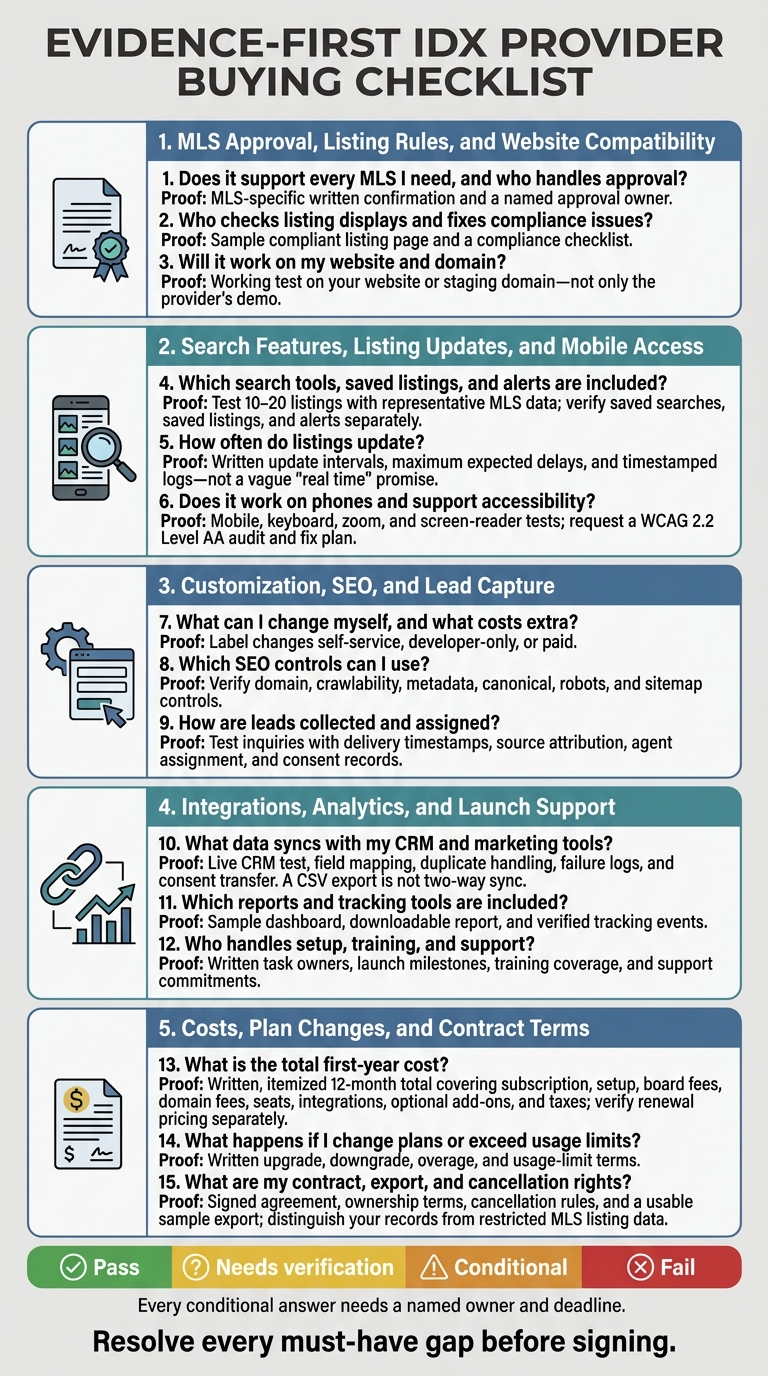
I use these 15 questions to check what I’m buying:
- Does it support every MLS I need, and who handles approval?
- Who checks listing displays and fixes compliance issues?
- Will it work on my website and domain?
- Which search tools, saved listings, and alerts are included?
- How often do listings update?
- Does it work on phones and support accessibility?
- What can I change myself, and what costs extra?
- Which SEO controls can I use?
- How are leads collected and assigned?
- What data syncs with my CRM and marketing tools?
- Which reports and tracking tools are included?
- Who handles setup, training, and support?
- What is the total first-year cost? (Be sure to compare IDX Broker vs EasyAgentIDX to see how fees and features stack up.)
- What happens if I change plans or exceed usage limits?
- What are my contract, export, and cancellation rights?
My rule: <u>test before signing</u>. I’d check 10–20 listings, submit test inquiries, and request a sample export. Then I’d match the results to the quote and contract - not rely on “coming soon” promises.
How to Choose an IDX Provider: 15 Checks Before Buying
MLS Approval, Listing Rules, and Website Compatibility
1. Do You Support My MLSs, and Who Handles Approval?
Get a written list of the exact MLSs you need. Confirm that your brokerage, agents, service area, and property types qualify for access. Ask whether coverage comes directly from the MLS or through a third-party feed, which fields and statuses are available, and whether coverage differs by county or board.
Also, pin down who submits the feed application, answers MLS questions, and manages domain authorization.
You can prepare your site while approval is pending, but wait for the required authorization before displaying live listings. Vague coverage claims, unsupported MLS names, and promises to launch before approval are red flags.
Once you’ve confirmed coverage, check the rules for displaying those listings.
2. How Do You Keep Listing Displays Compliant?
Ask the provider to check a sample listing page against each MLS’s rules and applicable state requirements. Review brokerage and source attribution, contact details for comments or inquiries, disclaimers, and fair-housing language. Verify which fields and pending or sold statuses you can display, along with how the system handles seller opt-outs and withheld addresses. Missing disclosures or data displayed without permission can get a page flagged or require fixes.
IDX permissions do not automatically include VOW access or confidential data. EasyAgentIDX widgets can automatically insert board-specific disclaimers and enforce branding and logo requirements. With a custom API setup, your developer must display the supplied compliance metadata and required page elements.
Ask who tracks rule changes, receives violation notices, fixes displays, and pays for those fixes. Promises to expose confidential fields or unsupported statuses are red flags.
Next, verify that the required display elements appear correctly on your actual site and domain.
3. Will IDX Work on My Website and Domain?
Test the feed on your actual website setup before buying. Ask for a live test or staging installation - not just a generic demo. Confirm that it works with your platform, custom domain, and SSL certificate. Check security settings, consent tools, and hosting, and make sure your plan permits the required scripts or embeds.
EasyAgentIDX lists support for WordPress, Squarespace, Wix, Webflow, Framer, Next.js, and custom HTML. You should still test it with your specific configuration.
Test search, listing detail pages, maps, and lead forms. With your existing scripts enabled, check navigation, analytics tags, and redirects. Compare page speed before and after installation, look for layout or script conflicts, and ask the provider to disclose any required redesign before you buy.
If accessibility is part of your requirements, test keyboard navigation, focus states, form labels, color contrast, zoom, and screen-reader behavior.
If possible, request a time-limited proof of concept on your domain using your branding, navigation, lead form, and a representative MLS feed. Test it in current desktop and mobile browsers. Require written acceptance criteria covering approval, compliance, domain ownership, performance, accessibility, and lead delivery. A demo that works only on the provider’s site - or cannot be reproduced on yours - is not proof of compatibility.
Search Features, Listing Updates, and Mobile Access
4. Which Search and Listing Features Are Included?
Once the feed works on your site, test how buyers search actual MLS data.
Build a 10–20 listing test set covering property types, price ranges, ZIP codes, statuses, and neighborhoods. Test address and MLS-number searches, autocomplete, map and boundary searches, sorting, and every filter your market uses. Check photo galleries, pagination or infinite scroll, and listing detail pages.
Treat saved searches, saved listings, and alerts as separate features. Confirm that buyers can save individual homes, save search criteria, and receive email or text alerts. Test the pause and unsubscribe controls, too.
Start with a modern IDX platform demo, then repeat the same workflow with your own MLS data after approval. Compare beds, baths, price, status, photos, and location against the MLS record. Before flagging a missing property as an error, check for seller exclusions that may keep it out of IDX. Flag inaccurate map pins, missing local filters, and features that don’t work with your MLS data.
5. How Often Are Listings Updated?
Ask for written update intervals and maximum expected delays for new listings, price changes, status changes, removals, and photo corrections. Get a specific delay - not a vague “real time” promise. Stale data hurts trust and lead conversion. For a recent change, request timestamps showing when it changed at the source, entered the feed, and appeared publicly.
Require a documented process for stale feeds, failed imports, duplicates, withdrawn listings, and missing images. Find out who gets alerts, how soon support responds, and how records are reconciled after an outage. Flag undefined update promises, manual deletion as the only correction method, or the lack of a process for removing outdated records.
6. Does IDX Work on Mobile and Support Accessibility?
Test the same buyer journey on iOS and Android phones and a tablet using current Safari and Chrome: search, adjust filters, open photos, save a search, and send an inquiry. Check that filters stay in place when buyers use the back button and that mobile users can complete the same core tasks as desktop users.
Request a WCAG 2.2 Level AA audit and fix plan. Then test saved-search dialogs and form errors with a keyboard and screen reader. Flag horizontal scrolling, tiny controls, keyboard traps, unlabeled fields, or an automated accessibility score offered as the only proof.
After checking search, updates, and mobile performance, evaluate customization, SEO controls, and lead routing.
Customization, SEO, and Lead Capture
7. What Can I Customize?
Ask which design elements you can edit without a developer’s help. Cover typography, colors, buttons, listing cards, map styles, filters, saved searches, inquiry forms, agent profiles, collections, and widgets. Label each change as self-service, developer-only, or paid.
Confirm whether agent-specific and neighborhood pages can have their own URLs, titles, descriptions, images, calls to action, and lead-routing rules. Watch for locked branding, fees for basic edits, or layouts that hide required brokerage ID, listing attribution, or contact details.
Once you know how the pages can look, check whether search engines can find and index them.
8. What SEO Controls Are Available?
Confirm that IDX pages stay on your brokerage domain and that search engines can crawl them. Check your controls for titles, meta descriptions, canonicals, robots tags, XML sitemaps, structured data, and duplicate filter URLs.
Ask which pages are deliberately excluded from indexing and what MLS restrictions apply. Crawlable doesn’t mean indexed, and indexed doesn’t mean ranked.
Next, check what happens when someone submits an inquiry.
9. How Are Leads Collected and Routed?
Check when visitors are asked to register, which form fields are required, and how you can set consent language and privacy links. Submit test inquiries, then verify the recipient, delivery path, source URL, timestamp, assigned agent, and consent record.
Test routing by agent, office, geography, and round-robin assignment. Include backup assignment when an agent is unavailable. Ask how duplicate contacts are merged and whether existing clients stay with their original agents.
Get lead ownership, export rights, retention rules, and usage limits in writing. Watch for delivery limited to a generic inbox, unclear ownership, or lead caps that weren’t disclosed. Treat home-valuation tools as separate products, and reject conversion claims that lack a baseline, sample size, and measurement period.
Integrations, Analytics, and Launch Support
10. Will IDX Connect to My CRM and Marketing Tools?
Once you’ve defined lead capture, check that those leads reach your CRM and marketing tools with the right data attached.
Ask for a live test showing exactly which fields move between systems: name, email, phone, saved-search criteria, inquiry message, assigned agent, consent status, lead source, and timestamps. Check whether CRM updates flow back to IDX. A CSV export, email alert, or one-time import is NOT two-way sync. Get documentation covering the connection type, supported CRM versions, required subscription levels, API or webhook availability, field-mapping limits, and custom-field support.
Confirm how the system matches records - by email, phone, or CRM ID - and updates repeat submissions. Test a duplicate submission, an invalid field, and a CRM outage. Then check the logs for successful transfers, failures, retries, timestamps, and errors. Watch for leads that disappear without an alert, missing error history, or manual cleanup without a list of failed records.
Test transfers to your team’s email, text messaging, call tracking, advertising, scheduling, and automation tools. UTM data, landing page, campaign, referrer, agent assignment, and the source property or search should stay attached to each lead. Consent and opt-out status should transfer, too.
11. What Analytics and Reports Are Available?
With data syncing correctly, check whether reports show how buyers search, engage, and become clients.
Request a sample report that covers search activity, listing views, saved searches, registrations, inquiries, phone calls, form submissions, showing requests, and lead-to-client conversions - not just pageviews. Review metric definitions, agent and office filters, user access levels, export formats, and data retention periods.
For EasyAgentIDX, GA4 event forwarding is available on Pro and higher plans. Identify which events reach GA4 and verify them in DebugView or an equivalent tool. Confirm that conversions aren’t counted twice and that campaign data connects to CRM outcomes. Flag unclear attribution or reports you can’t access.
12. Who Handles Setup, Training, and Support?
Get a written responsibility matrix that names who handles each launch task: the provider, brokerage, website developer, MLS, or CRM administrator. Cover MLS access, widget or script installation, domain mapping, listing disclosures and attribution, form testing, and lead delivery.
MLS approval typically takes 3–14 business days, depending on the board. Require a schedule with deliverables, task owners, approval points, and documented test results before launch. Ask for a free correction window after launch, with clear coverage and deadlines.
Check whether onboarding includes live training for administrators and agents, written documentation, recordings, and guidance on reviewing leads and reports. EasyAgentIDX lists priority support for Pro and higher plans, priority onboarding for Brokerage, and a custom service-level agreement for Enterprise.
Priority support does not guarantee a response time. Get plan-specific commitments in writing, including who fixes broken CRM connections or missing listings. Tie each launch responsibility to the quoted onboarding, support, and correction terms before comparing prices.
Costs, Plan Changes, and Contract Terms
13. What Is the Total Cost?
Look beyond launch costs and ask what you’ll pay over a full year. Get current plan names, monthly rates, setup fees, included board connections, and any pass-through MLS charges.
Use this worksheet to separate recurring costs from one-time fees:
| Cost item | Amount to verify |
|---|---|
| Subscription | Monthly rate × 12 |
| One-time setup | Initial setup charges |
| Board fees | Additional connections, setup, and MLS pass-through charges |
| Domain fees | Recurring and setup charges |
| Seats | Additional users × annual seat cost |
| Integrations | Separate subscriptions, API charges, and overages |
| Optional add-ons | Annual cost of selected extras |
| Taxes | Applicable taxes |
| Total | All first-year charges |
Get the full 12-month total in writing, including taxes, add-ons, usage limits, and renewal pricing. Keep one-time setup fees separate from recurring charges. Watch for undisclosed fees, mandatory add-ons, per-lead charges, and undefined “fair use” limits.
14. What Happens When My Needs Change?
Next, check how your bill changes as your business grows. Ask how upgrades, downgrades, and usage overages are billed when you change agents, offices, domains, MLS boards, or add-ons. Confirm when changes take effect and whether they require new approvals or data resets.
Make sure changes preserve permissions, historical data, and lead-routing rules. Unused valuations do not roll over. Ask whether excess usage leads to throttling, suspension, or a forced upgrade. Treat unclear growth charges as a stop sign. Don’t count on upcoming features like HomeThread until they’re available in the plan you’re buying.
15. What Are My Contract, Data, and Cancellation Rights?
Before signing, check what happens to your data and access if you cancel or downgrade. Review the signed agreement for auto-renewal, cancellation notice, price-change terms, suspension rights, and termination rules. Verify any cancellation fees and your final billing date. Also confirm whether payments are nonrefundable, except when MLS approval fails and the service never activates.
Require a usable export of your leads before access ends. Confirm your export rights for leads, consent records, notes, saved searches, analytics, and custom content. Separate those rights from restrictions on MLS listing data. Request sample CSV or JSON files, export costs, retention periods, and a recovery period.
Check when widgets stop displaying listings, API access ends, and lead routing shuts down. Missing exports, unclear ownership, or deletion without time to recover your records are serious red flags.
Conclusion: Review Your Scorecard Before Signing
Use this scorecard to turn the 15 answers into a buying decision. Record each answer with a contact name and date. Mark each row Pass, Needs verification, Conditional, or Fail. Use the notes column to track gaps, owners, and deadlines.
| Question | Provider response | Evidence requested | Status | Decision notes |
|---|---|---|---|---|
| 1. Do you support my MLSs, and who handles approval? | - | MLS-specific confirmation and approval timeline | - | - |
| 2. How do you keep listing displays compliant? | - | Sample compliant listing page and compliance checklist | - | - |
| 3. Will IDX work on my website and domain? | - | Demo on your site or staging domain | - | - |
| 4. Which search and listing features are included? | - | Live feature demo and included feature list | - | - |
| 5. How often are listings updated? | - | Documented intervals and timestamped logs | - | - |
| 6. Does IDX work on mobile and support accessibility? | - | Phone, keyboard, zoom, and accessibility tests | - | - |
| 7. What can I customize? | - | Hands-on branding and layout demo | - | - |
| 8. What SEO controls are available? | - | URL, metadata, and indexation controls | - | - |
| 9. How are leads collected and routed? | - | Test inquiries with delivery timestamps and source attribution | - | - |
| 10. Will IDX connect to my CRM and marketing tools? | - | Integration documentation and live CRM test | - | - |
| 11. What analytics and reports are available? | - | Sample dashboard and downloadable report | - | - |
| 12. Who handles setup, training, and support? | - | Launch milestones, support hours, and escalation contact | - | - |
| 13. What is the total cost? | - | Itemized first-year and renewal quote | - | - |
| 14. What happens when my needs change? | - | Written plan-change and usage terms | - | - |
| 15. What are my contract, data, and cancellation rights? | - | Agreement, ownership clauses, and sample export | - | - |
| Risk signal | Why it matters | Required resolution |
|---|---|---|
| Unverified MLS approval | You may lack permission to display listings. | Get market-specific written confirmation and name the approval owner. |
| Vague update claims | You can't verify how current the listings are. | Require a defined update interval, outage process, and sample logs. |
| Missing exports | Your records may be stranded. | Test an export and confirm the format, delivery window, and post-cancellation access. |
| Unclear data ownership | Control of your assets may be disputed. | Include ownership and post-cancellation delivery rights in the agreement. |
| Undisclosed fees | Costs may exceed the quote. | Require a complete, itemized quote covering add-ons, MLSs, seats, support, taxes, and cancellation charges. |
Resolve every must-have gap before signing. Every conditional answer needs a named owner and deadline.
Request an EasyAgentIDX demo and written quote covering your MLSs, website, domains, team size, and routing needs. During the demo, run representative searches and submit test leads. Then check that the quote and agreement match your completed scorecard.